Creating your own dataset
Contents
Creating your own dataset#

Using JAX arrays#
Nodes and graph structure#
This notebook includes an example of how to create your own dataset for Haiku Geometric.
[ ]:
!pip install haiku-geometric
[2]:
import jax
import jax.numpy as jnp
import haiku as hk
Currently, all GNNs layers in Haiku Geometric expect the following inputs:
nodes: ajax.numpy.ndarrayarray of shape[num_nodes, num_node_features]containing the node features.senders: ajax.numpy.ndarrayarray of shape[num_edges]containing the indices of the source nodes.receivers: ajax.numpy.ndarrayarray of shape[num_edges]containing the indices of the destination nodes.
Notice that no object is actually necessary to use Haiku Geometric. It can be used with only JAX numpy arrays. If you want to create an object to store the graph data see Creating a graph object.
Lets say we want to create the following graph, with 4 nodes, 5 edges and 3 features for each node:
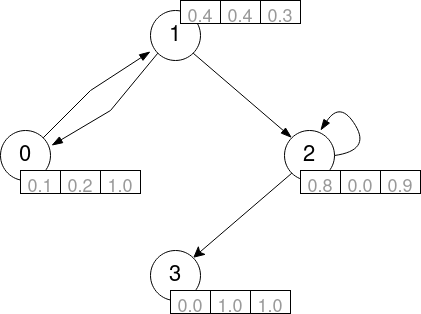
To create the nodes array we arrange the features into a 2D array with the aforementioned shape:
[ ]:
nodes = jnp.array([
    [0.1, 0.2, 1.0], # node 0 features
    [0.4, 0.4, 0.3], # node 1 features
    [0.8, 0.0, 0.9], # node 2 features
    [0.0, 1.0, 1.0]  # node 3 features
])
To create the senders and receivers, for each directed edge of the graph we need to specify the index of the source node and the index of the destination node:
[4]:
senders = jnp.array([0, 1, 1, 2, 2])
receivers = jnp.array([1, 0, 2, 2, 3])
Notice that self edges are represented by having the same index for the source and destination nodes. Similarly, to model undirected graphs we can use 2 directed edges, each in one direction.
Edge features#
Some GNN layer also allow the user to specify edge features. In that case, the layer expects, besides from the previous arrays, the following input:
edges: ajax.numpy.ndarrayarray of shape[num_edges, num_edge_features]containing the edge features.
Let us now consider this graph where each edge has 2 features associated:
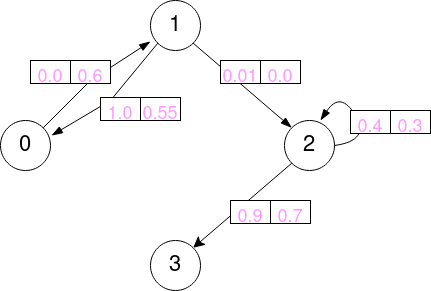
To represent these features, we create an array of shape [num_edges, num_edge_features] with the edge features:
[5]:
edges = jnp.array([
    [0.0, 0.6],  # edge from 0 to 1
    [1.0, 0.55], # edge from 1 to 0
    [0.01, 0.0], # edge from 1 to 2
    [0.4, 1.3],  # edge from 2 to 2
    [0.9, 0.7]   # edge from 2 to 3
])
Notice that the order of the features in the array must match the order of the edges in the senders and receivers arrays.
DataGraphTuple#
In Haiku Geometric, the DataGraphTuple object is used to store the graph data. When using datasets provided from haiku_geometric.datasets, each individual graph of a dataset is represented by a DataGraphTuple object.
DataGraphTuple can be created as follows:
[ ]:
from haiku_geometric.datasets.base import DataGraphTuple

DataGraphTuple(
    nodes=nodes,
    senders=senders,
    receivers=receivers,
    edges=edges,
    n_node=4,
    n_edge=5,
    globals=jnp.array([0.0, 0.0, 0.0]),
    position=None,
    y=jnp.array([0.0, 1.0, 0.0, 0,0]),
    train_mask=jnp.array([True, True, True, False]),
)
Besides the nodes, senders, receivers, edges arrays, the DataGraphTuple object also contains the following attributes:
n_node: the number of nodes in the graph.n_edge: the number of edges in the graph.globals: if available, an array containing the global features.position: some datasets might also provide position features for each node. If available, an array containing the position of each node.y: an array containing ground truth labels.train_mask: an array containing a boolean mask.
Notice that all the attributes are optional. If you don’t have a specific attribute, you can simply set it to None.